
RB2B AI: ASK US ANYTHING
I've spent considerable time testing Leadfeeder, and while it's been a recognizable name in B2B visitor identification for years, I kept running into the same frustration: great, I know Acme Corp visited my pricing page, but who do I email? The CEO? The marketing manager? Someone in IT who accidentally clicked a link?
In this guide, I'll break down Leadfeeder pricing costs, what you actually get for your money, and how it stacks up against alternatives like RB2B, 6sense, Clearbit, and Demandbase. Stick around until the end. I'll show you how to get person-level visitor identification (not just companies) for FREE.
Leadfeeder is a website visitor identification tool that reveals which companies visit your website, even if they never fill out a form.
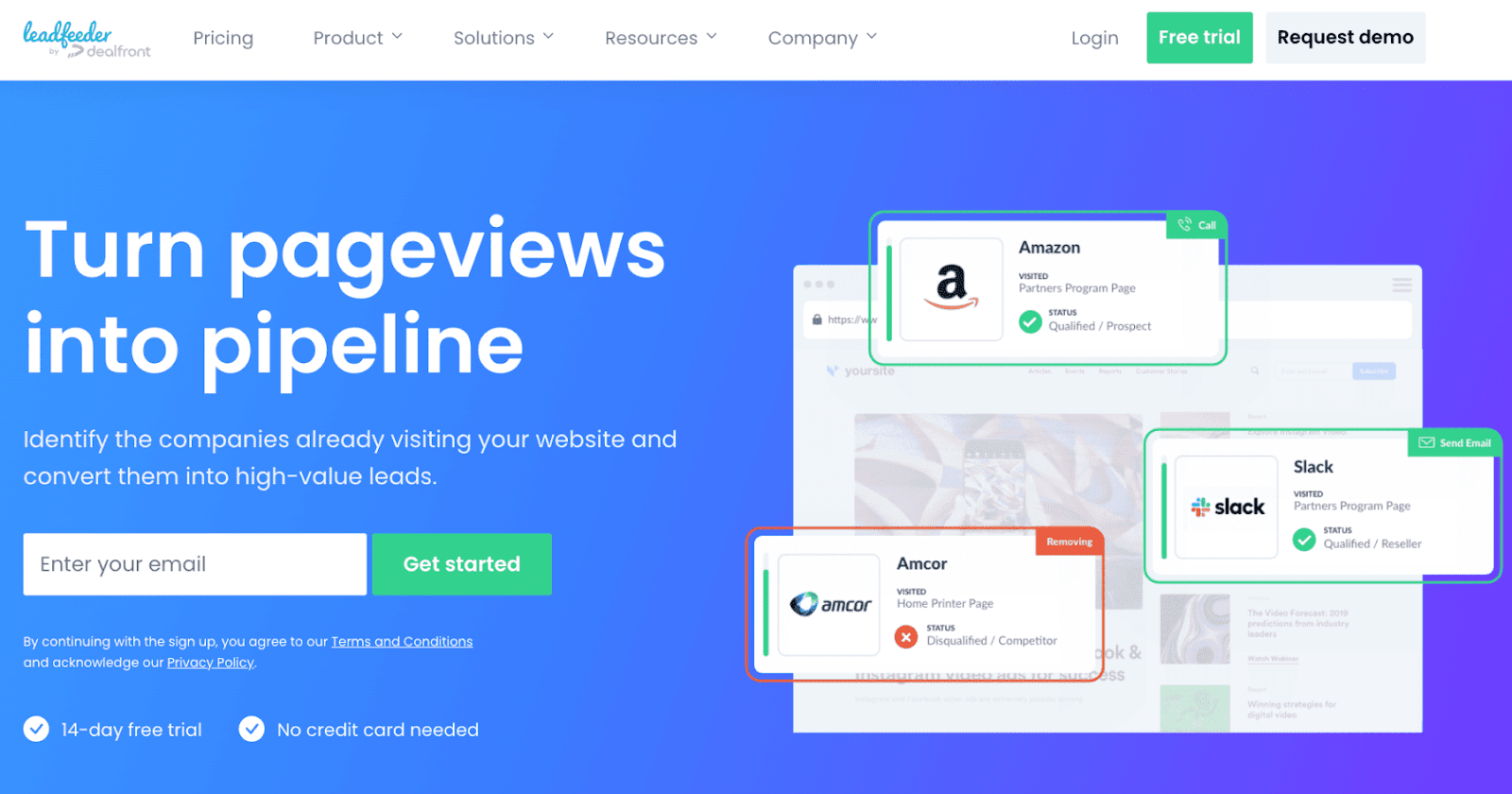
It uses IP tracking and firmographic data to show company names, locations, sizes, and traffic sources, then syncs with your CRM for follow-up.
In short, it's designed to answer a key question for every B2B marketer: Who's interested in our business, and how can we turn them into leads?
The problem? It stops at the company level. And in 2025, that's just not enough.
When it comes to cost, Leadfeeder keeps things fairly straightforward, at least on the surface.
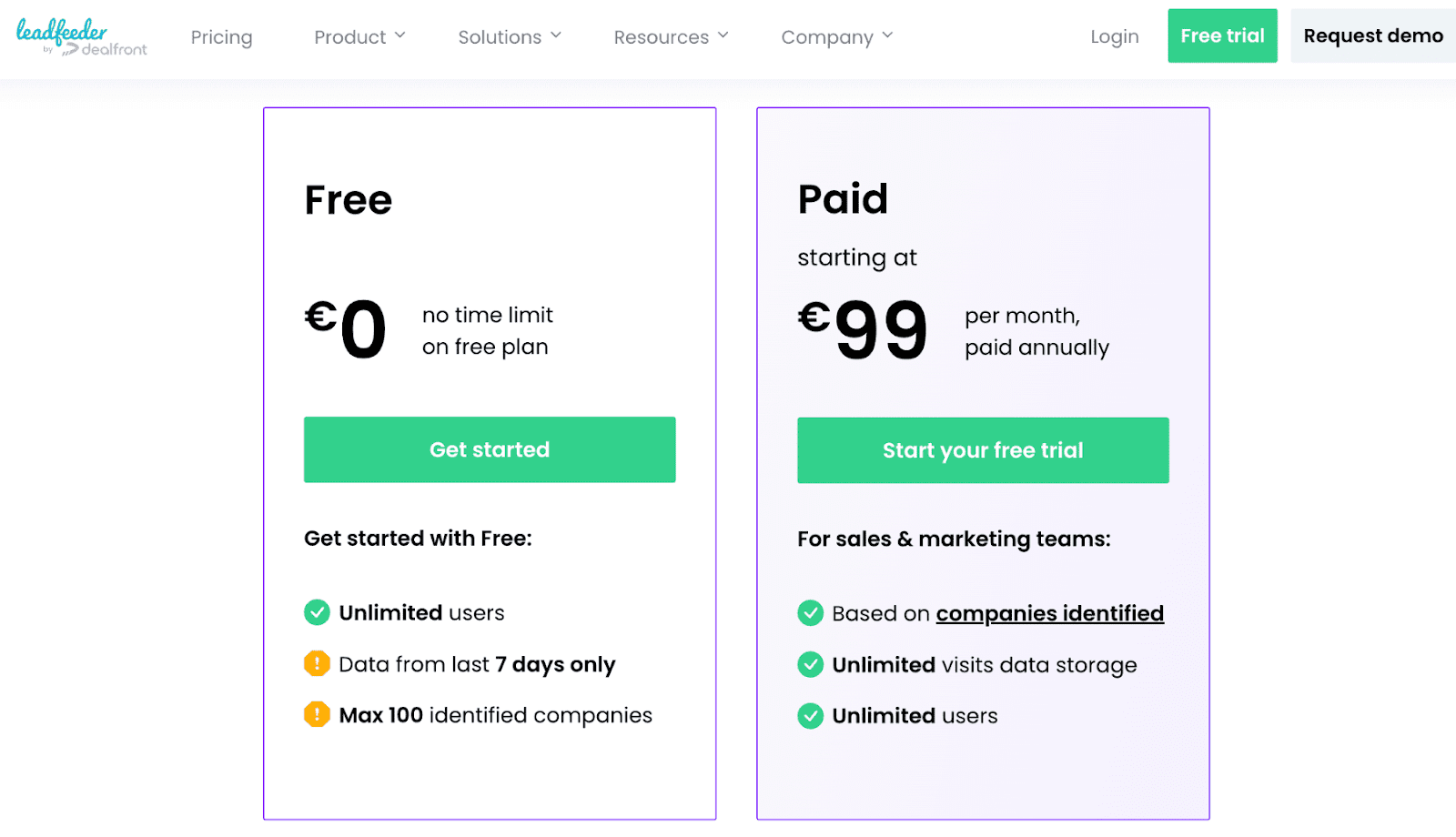
Leadfeeder offers 2 plans: Free and Premium.
But here's where it gets tricky: pricing scales fast once your traffic grows.
Let me break down what you actually get with each plan.
Leadfeeder’s Free plan is more of a trial than a long-term solution. You get access to a limited data history (just 7 days) and can view basic company details. Features like lead scoring, CRM integrations, and filtering are locked behind Premium, making this plan impractical for teams needing automation.
The Premium plan includes integrations, automation, and unlimited user seats.
Pricing starts at €99/month.
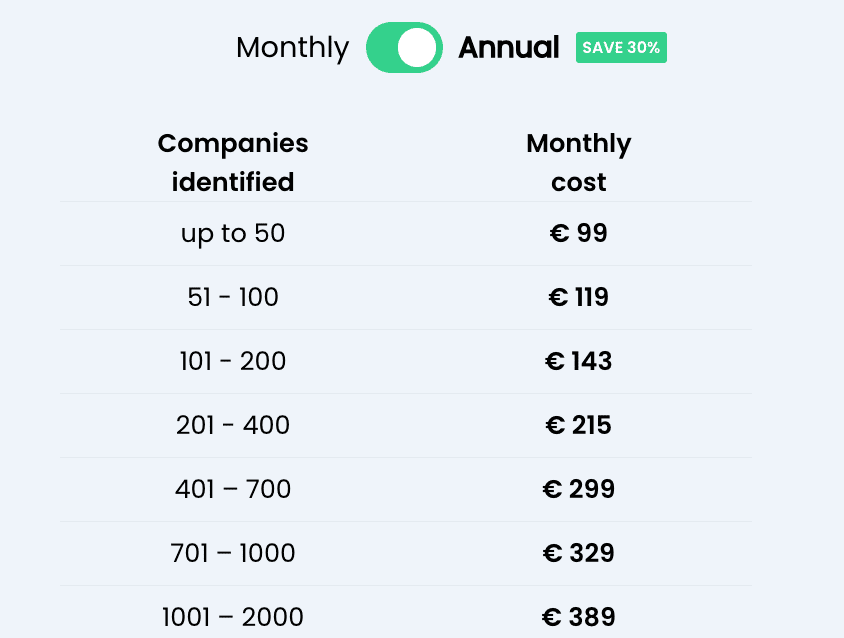
Leadfeeder bills per identified lead, so costs can rise fast as traffic grows, sometimes adding hundreds (even thousands) per month.
Leadfeeder offers a solid mix of tracking, enrichment, and automation tools. However, some capabilities feel dated compared to newer solutions like RB2B.
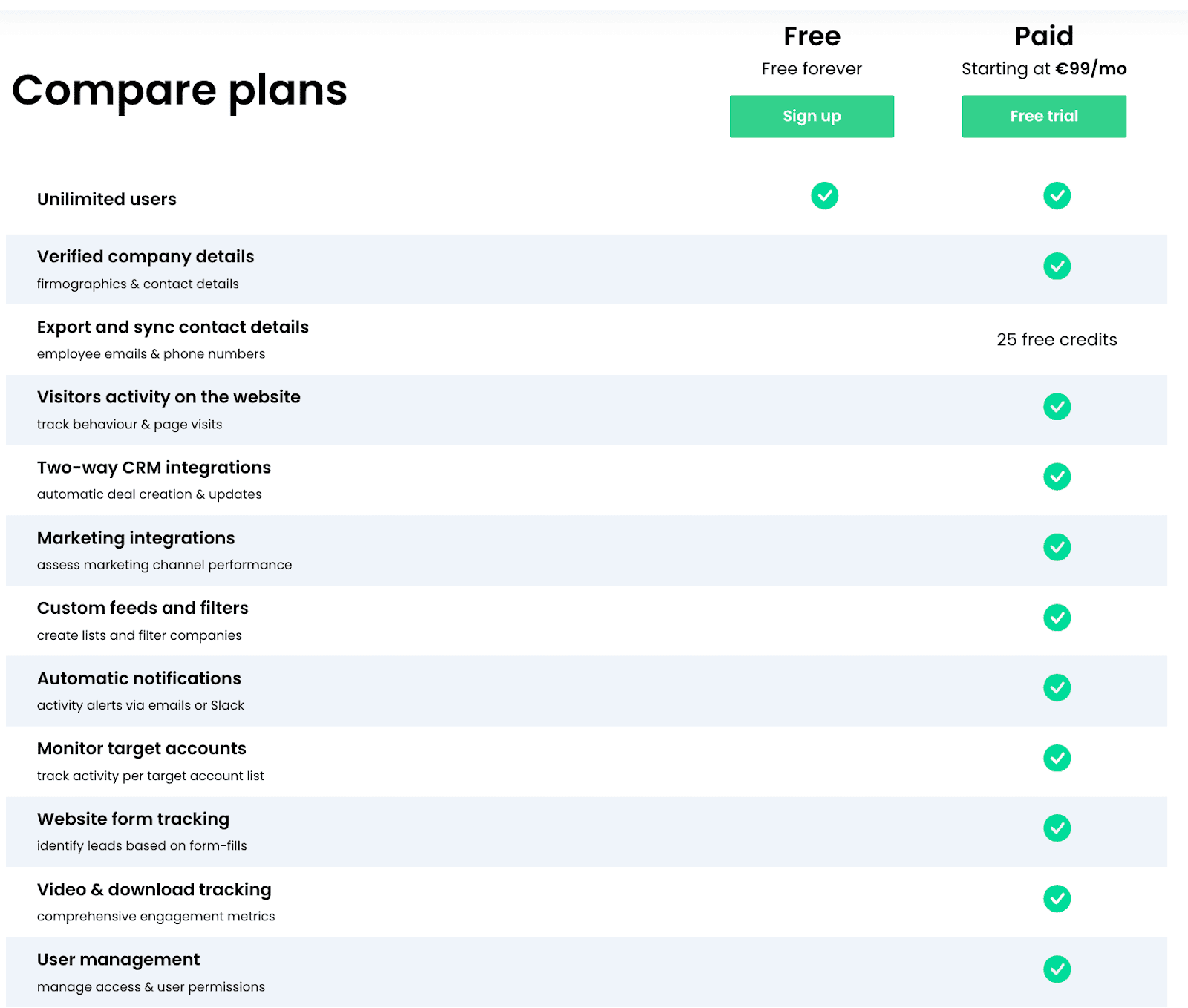
Here's what made Leadfeeder a fan favorite (and where it falls short):
Leadfeeder's core feature is IP-based company identification. It matches your visitor's IP address to a database of known businesses, allowing you to see:
While effective, this method relies heavily on IP matching accuracy. With remote work and shared IPs becoming the norm, identification rates can be hit-or-miss. You might see "Unknown Company" more often than you'd like.
Leadfeeder integrates with major CRMs like:
You can automatically sync identified leads, assign them to reps, and trigger workflows. However, the integrations are fairly linear. They pass data into your CRM, but don’t always pull deep engagement insights back into Leadfeeder.
Custom feeds allow you to segment traffic by behavior or firmographics. You can score leads based on visit frequency or specific page views, helping sales prioritize outreach.
These tools are helpful for teams managing high traffic volume, though the configuration takes considerable time and technical expertise.
Leadfeeder is fully GDPR compliant. All IP-to-company matching happens within EU data privacy frameworks, which is great if that's a priority for your business.
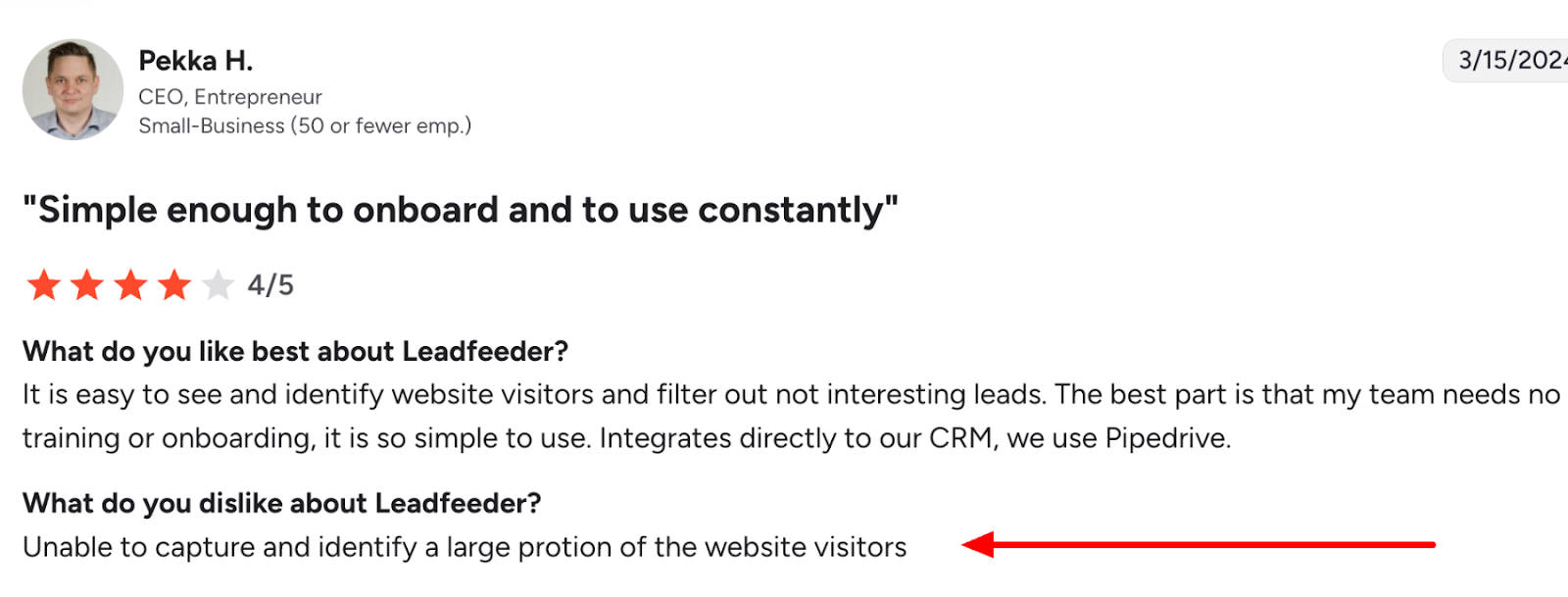
Data accuracy, however, depends heavily on IP coverage. While Leadfeeder has strong coverage in Europe, I noticed North American datasets aren't as comprehensive as those from U.S.-based competitors. Some users have reported similar frustrations with data gaps.
Leadfeeder offers support via email and live chat, though availability can vary by region and plan tier. There's no publicly listed guaranteed response time, which can be frustrating when you're troubleshooting.
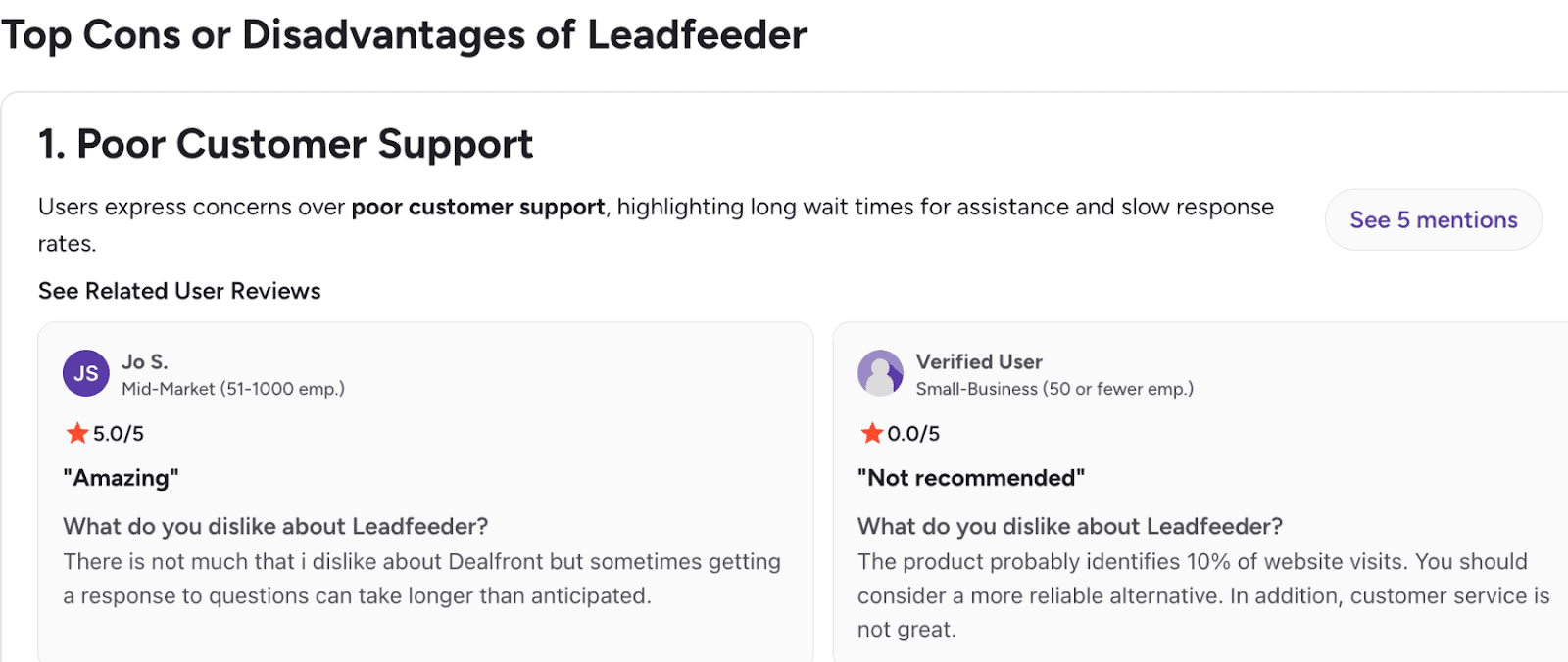
Many users report friendly service but slower responses during high-traffic hours or onboarding phases.
The platform also includes an extensive knowledge base and video tutorials. Onboarding is largely self-guided, which is suitable for digital-savvy marketers. However, I’ve found that less technical teams need more hands-on help.
Leadfeeder’s free plan lets you sample the basics. RB2B's free tier offers full visibility into your top anonymous visitors with no time limit. You can test core visitor identification features. It only holds back on CRM-syncing, email address identification, and automations.

FYI, RB2B is a website visitor identification tool that goes beyond traditional company-level tracking to reveal the actual individuals browsing your site. After setup, RB2B identifies visitors via cookies, device IDs, IP addresses, and Demandbase’s Reverse-IP network.
What sets RB2B apart is its person-level tracking. You get full individual profiles, including job titles, LinkedIn profiles, and verified work emails for hyper-personalized outreach. The platform identifies 70-80% of U.S. website traffic at the person level.
And when someone from your target accounts hits key pages, you get Slack notifications in real-time. No more missing hot leads!
The best part? You can get started for free!
As for paid plans, both start around the same price point—Leadfeeder at €99/month (about $130/month) and RB2B at $129/month.
However, once the number of companies you identify with Leadfeeder exceeds 100, pricing starts to skyrocket.
With RB2B, you have flat, transparent tiered plans based on the number of credits you use. No surprise bills when your traffic grows.
Leadfeeder provides visitor identification, but RB2B goes a step further by delivering richer firmographics, campaign-level attribution, and AI-assisted lead qualification.
RB2B also takes the cup on the lead-scoring front, with advanced AI-based scoring. Check out the table below for a feature comparison:
If you're scaling your B2B marketing and want to move beyond basic traffic reports, RB2B provides a more flexible, automation-friendly alternative at a comparable (or lower) cost. It’s perfect for marketers seeking a value-based lead generation tool.
Leadfeeder competes in a crowded space of intent and visitor intelligence tools. Here's how it stacks up against some major names:
Clearbit (now called Breeze Intelligence) offers firmographic enrichment, data APIs, and reverse IP lookup similar to Leadfeeder. However, it also enhances contact-level data for outbound and personalization use cases, which I found incredibly useful.
Pricing: Starts around $99/month for basic enrichment, scaling with usage.
Verdict: Clearbit provides richer data depth and more flexible use cases, while Leadfeeder is simpler for marketers focused solely on web traffic identification.
Lead Forensics and Leadfeeder are often compared directly. Both use IP tracking to identify visiting companies, but Lead Forensics includes a more aggressive data collection model and dedicated account management.
Pricing: Around $150–$500/month, depending on traffic.
Verdict: Lead Forensics is heavier on manual follow-up and sales outreach; Leadfeeder is simpler and more marketing-friendly.
I found Leadfeeder to be a decent entry-level solution for B2B marketers who:
However, as your marketing stack grows, you'll likely find the pricing and limited automation frustrating. Teams that rely heavily on integrations, AI lead scoring, or flexible workflows may outgrow Leadfeeder fast.
If you're comparing visitor intelligence tools, RB2B stands out for 3 key reasons:
RB2B offers an always-free tier with full access to core features. No trial limits, no "upgrade to view results" gates. Just clear, scalable pricing when you need more volume.
While Leadfeeder tells you which company visited, RB2B shows you which person and why they're interested. Its data enrichment combines firmographics, intent signals, and campaign attribution, enabling you to prioritize leads that are actively engaging with your content.
RB2B integrates seamlessly with CRMs, marketing automation tools, and sales platforms. It's built to accelerate pipeline creation without complex setup or enterprise pricing.
For small and mid-market teams, RB2B provides the visibility and flexibility that Leadfeeder users often wish they had.
Leadfeeder remains a reliable player in the website visitor identification space. Its straightforward interface, CRM integrations, and GDPR compliance make it appealing for smaller B2B teams just getting started.
However, its limited free plan, usage-based pricing that scales quickly, and basic automation make it less practical for scaling organizations. I found myself constantly hitting walls when trying to do more sophisticated lead qualification.
If you're looking for a modern, cost-effective alternative that combines visitor identification with actionable intelligence, RB2B is worth a serious look. The person-level identification alone is a game-changer.
The RB2B setup process is straightforward—you only need to:
The basic version is 100% FREE to use, and you can explore additional features with a 30-day Pro trial. Get RB2B's Person-Level Website Visitor ID tool today and unlock detailed lead insights within minutes.
Alert your reps, start automated outreach, and add to lead score in under five minutes.

